Scan. Sell. Deliver.
Replace weeks of manual discovery with a 15-minute automated scan. Walk into the meeting with the scope ready.
You are the expert. We are the tool.
CloudPruneAI combines FinOps + AI + Infrastructure as Code to scan cloud accounts, find savings, and generate ready-to-deliver reports with Terraform, CloudFormation & CDK code.
CloudPruneAI is not affiliated with, endorsed by, or sponsored by Amazon Web Services, Microsoft Azure, CloudHealth (VMware), or Apptio (IBM).
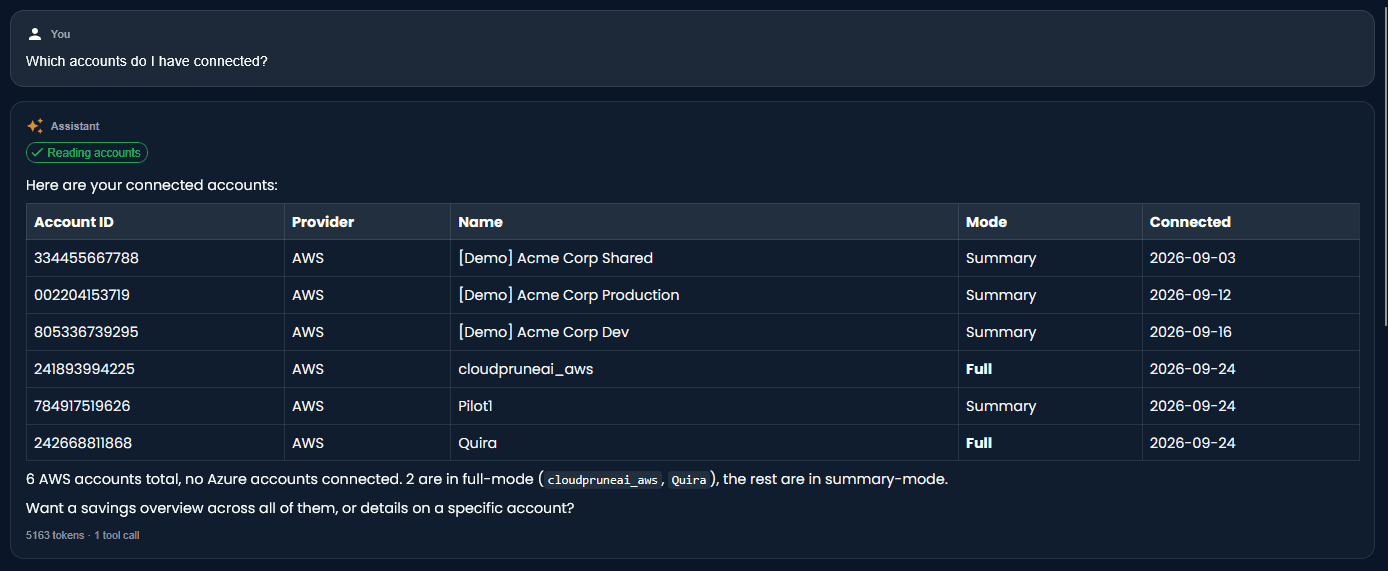
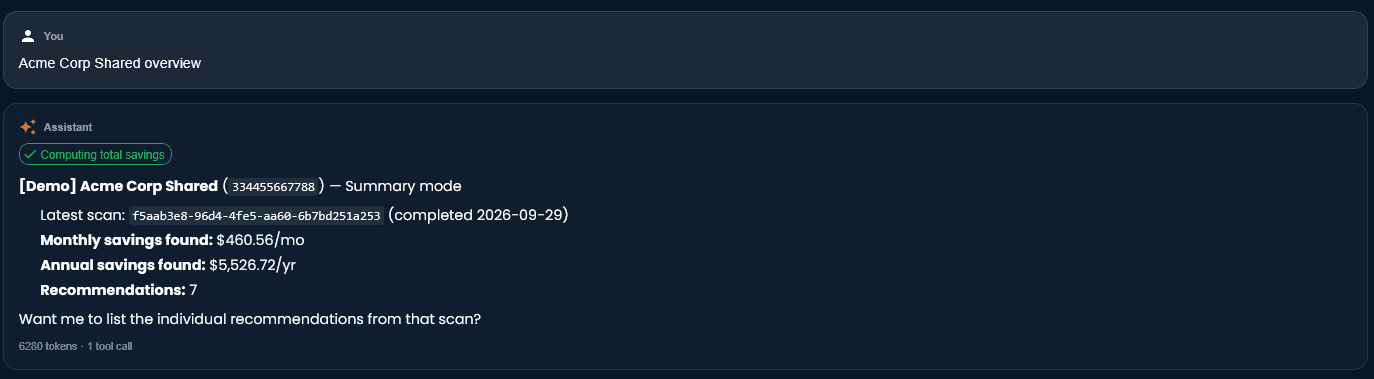
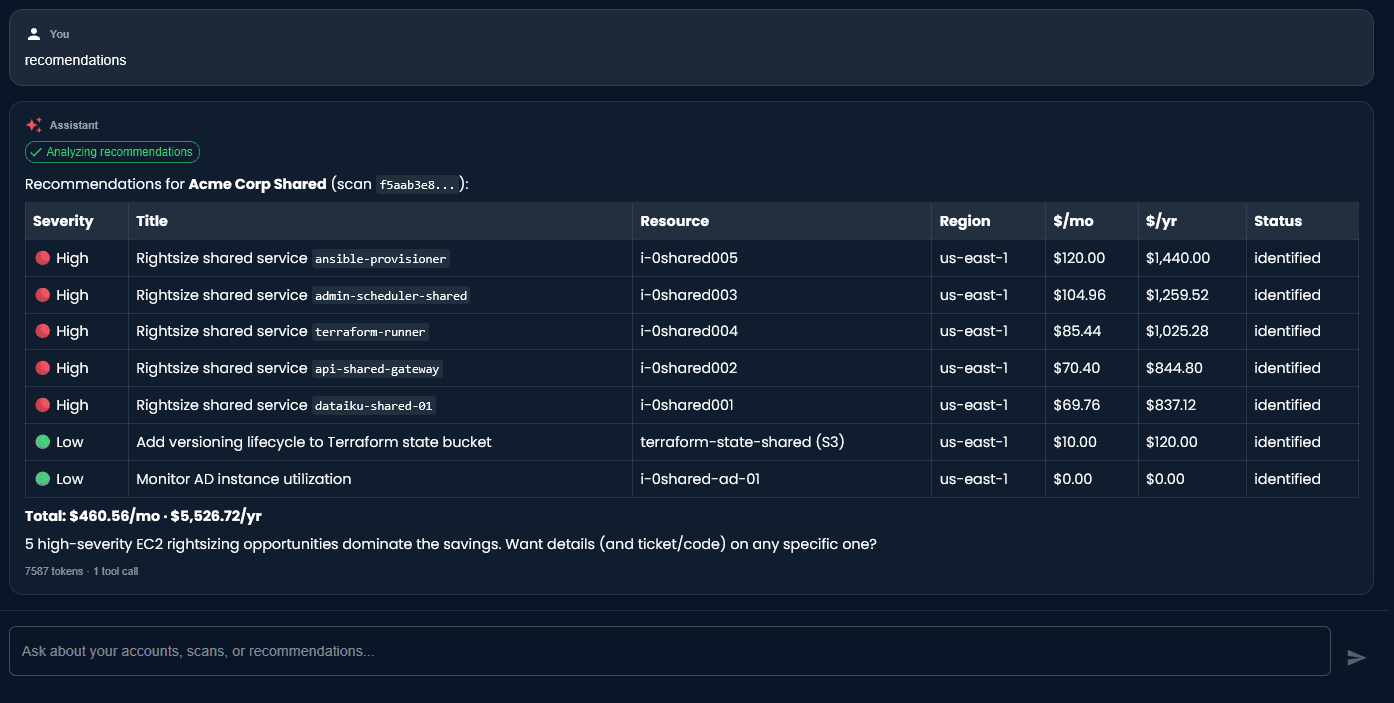
Talk to your savings.
Ask natural questions about your accounts, scans, and recommendations. Live workspace data, zero cross-tenant leakage.

- Total savings, top recs, ticket-ready code — in one thread.
- Workspace-scoped — the assistant only ever sees your own data.
- Free with your first account — no extra plan required.
Built on the FinOps Framework
Three phases. One platform. From visibility to sustained results.
See the waste
- -Unlimited free scans across 15+ categories
- -Executive summary PDF for your sales process
- -White-label reports with your brand
Always free to scan
Act on it
- -Resource-level detail with risk & downtime assessment
- -AI-generated Terraform, CloudFormation or CDK code
- -Multi-cloud coverage: AWS + Azure in the same scan
Included on every account
Keep capturing value
- -Recommendations Hub with ownership & workflow
- -Budget tracking & 6-month forecast
- -Daily anomaly alerts to Slack, Teams, or Email
1st account free · $49/mo each extra
How It Works
From prospect to deliverable in 15 minutes
Connect
~2 min
Your prospect deploys a read-only IAM role via CloudFormation. No cost.
Scan
~5 min
AI analyzes 15 categories of waste across EC2, RDS, S3, EBS, DynamoDB, ElastiCache, CloudWatch, and more. Always free.
Sell
Your pace
Present the executive summary to your prospect: "We found $187K/year in waste."
Deliver
Your project
Ship the branded report + IaC code (Terraform / CFN / CDK / Bicep) to your client. It's your client, your project, your relationship.
Track
Every account
Use the Hub, Budget, Ownership and Alerts views to keep catching drift. Turn a project into a retainer.
Grow
1st free · $49/mo each extra
Add more clients on the Pro plan: your first account is free, every extra is $49/month. Scale as your book grows.
We Don't Replace Your Expertise. We Accelerate It.
Spend less time finding problems and more time solving them.
Manual Discovery
- •2-4 weeks of manual analysis
- •Spreadsheets and guesswork
- •Hard to justify before the sale
- •Prospect waits, sale gets harder
FinOps Dashboards
- •Days to configure per client
- •Charts and graphs, no code
- •Generic recommendations
- •Still need your own team to implement
Every account, every feature
1st account free · $49/mo each extra · no feature gating
- 15 minutes, not 2 weeks
- Report + IaC code + branded PDF
- Recommendations Hub + Budget + Ownership
- Daily anomaly alerts to Slack / Teams / Email
- Client never sees CloudPruneAI
The bottleneck isn't the solution — it's the discovery and follow-through. We handle both.
Run a Test Scan TogetherReal Results (Beta)
Actual scan from a Series B Fintech production account
$18,617/mo
$223,402 annual savings identified
34 actionable recommendations
$16,770
S3 Storage Class
4 buckets → Intelligent Tiering
$1,521
EC2 Rightsizing
20 oversized instances
$223
Reserved Instances
4 candidates for RI
$102
Orphan Snapshots
6 unattached snapshots
Scan completed in 287 seconds • Production account • us-east-1
34 recommendations → 34 ready-to-review IaC modules generated (Terraform, CloudFormation or CDK) → branded PDF delivered to client.
Monthly AWS Spend:
Based on a real production cloud account scan — 34 recommendations applied in November 2025
Sample output — RDS Rightsizing recommendation #3:
# Generated by CloudPruneAI — Recommendation #3
# Estimated savings: $487.20/mo ($5,846/yr)

db = rds.DatabaseInstance(
    self, "MainDB",
    instance_type=ec2.InstanceType.of(
        ec2.InstanceClass.R6G,
        ec2.InstanceSize.XLARGE
    ), # was: r5.2xlarge — 14% avg CPU
)
What our users say
Many organizations struggle to clearly understand where their cloud spend is going, identify actionable savings, and—more importantly—execute those optimizations consistently.
CloudPruneAI solves this by combining AI-driven analysis with automated, code-level remediation, turning insights into real actions.
Simple pricing. Every feature on every plan.
Your first cloud account is free. Each additional account is $49/month. No gainshare, no per-scan fees.
Free
For dev / staging. Try the product with real data.
- Unlimited scans across AWS + Azure
- Full report + white-label PDF
- Deployable IaC: CDK, Terraform, CloudFormation, Bicep
- Recommendations Hub + Budget + Ownership
- Daily anomaly alerts to Slack / Teams / Email
Pro
For consultancies, freelancers, and in-house FinOps teams.
- All features on every account you connect — no gating
- Unlimited users per workspace
- Predictable pricing — no gainshare, no per-scan
- Cancel anytime · access until period end
- Self-serve billing via Stripe Checkout
No credit card required for the first account. See pricing details and per-scale examples →
Frequently Asked Questions
Everything you need to know about CloudPruneAI
Does my client see CloudPruneAI?
No. CloudPruneAI is invisible to your client. They only see what you deliver — branded PDF reports with your logo and contact info. We are your internal tool.
Does CloudPruneAI make changes to cloud accounts?
No. CloudPruneAI uses read-only access to scan resources. We generate Infrastructure as Code (Terraform, CloudFormation or CDK) that your team reviews and deploys. We never modify, delete, or deploy anything.
What access does CloudPruneAI need?
A read-only IAM role deployed via a CloudFormation template. Auditable, revocable at any time. No write access, no deploy capabilities. We only access infrastructure metadata — no business data, no S3 objects, no secret values.
What cloud services do you scan?
AWS: 15 categories — EC2 rightsizing & zombie instances, EBS volumes, S3 lifecycle & storage class, RDS idle/oversized, DynamoDB idle & overprovisioned, ElastiCache idle & prev-gen, CloudWatch Logs retention, unused secrets & AMIs, orphan snapshots, zombie services, and cross-AZ/cross-region data transfer costs. Azure: in beta — idle VMs today, with Disk orphan, SQL idle and Reservations recommendations shipping next.
What is the "Talk to your savings" AI assistant and what can it do?
A natural-language conversational assistant built into the dashboard at /dashboard/assistant. Ask questions like "How much can I save in total?", "Give me the top 5 recommendations by savings", "What did the latest scan find in Acme Corp?", or "Generate the Jira ticket for recommendation 3". It reads live workspace data through read-only tools scoped to your account — three-layer workspace isolation (identity, application, database) means zero cross-tenant data access. Uses Anthropic Claude Sonnet; Anthropic's API has zero data retention. Rate limited at 50 queries per hour per user. Free with the first account.
How do I present findings to my client?
After scanning, you get a free executive summary with total savings and breakdown by category — enough to sell the assessment. Once the client commits, you unlock the full report with resource-level detail and IaC code (Terraform, CloudFormation or CDK), delivered as a branded PDF.
Do I have to pay before scanning?
No. Your first cloud account is free and you can scan it as many times as you want. When you connect a second account, the Pro plan starts at $49/month for each account beyond the first.
What IaC formats do you support?
CloudPruneAI generates Terraform HCL, CloudFormation YAML, AWS CDK (Python), and Azure Bicep — you pick whichever format your client uses. Instead of clicking around the console, your team deploys proven Infrastructure as Code for every recommendation.
How does the Pro plan pricing work?
Simple: 1 cloud account is free forever, and every additional account is $49/month. So 1 account = $0/mo, 2 accounts = $49/mo, 5 accounts = $196/mo, 10 accounts = $441/mo. One AWS account or one Azure subscription counts as one unit. Everything you see in the product works on every account — there is no feature gating between plans.
Do you charge gainshare or a percentage of savings?
No. Flat $49/month per additional account, regardless of how much or how little the account saves. Predictable for you, predictable for your clients. No revenue-share on the value the tool identifies.
Do you charge per scan?
No. Unlimited scans on every connected account, free or paid. Scan weekly, daily, on-demand — the price is the same.
How does CloudPruneAI compare to CloudHealth or Apptio?
CloudHealth and Apptio are FinOps dashboards targeting enterprise buyers with 6-figure ACVs and multi-month rollouts. CloudPruneAI targets the consultancy and MSP layer: setup in minutes not weeks, resource-level recommendations with deployable IaC code (not just charts), white-label reports for end clients, and predictable $49/account pricing. Different buyer, different price point, different job-to-be-done.
How does CloudPruneAI compare to AWS Cost Explorer or Azure Cost Management?
The native tools are essential for spend visibility but stop at “here is your bill.” CloudPruneAI adds the actionable layer: specific resources to change, the IaC code to change them, prioritization by dollar impact, ownership workflow, a natural-language assistant, and multi-cloud unification (AWS + Azure) in a single workspace.
Can I cancel the Pro plan?
Yes, anytime. Disconnecting accounts drops the count on the next billing cycle. If you go back down to a single connected account, the subscription is cancelled and you go back to the free tier. No cancellation fees, no commitment.
Ready to Accelerate Your FinOps Practice?
Let's scan one of your client's accounts together. No cost, no commitment.
You see the results. If it works, you keep the workspace.